Locating HTML elements with Node.js
In this lesson we'll locate product data in the downloaded HTML. We'll use Cheerio to find those HTML elements which contain details about each product, such as title or price.
In the previous lesson we've managed to print text of the page's main heading or count how many products are in the listing. Let's combine those two. What happens if we print .text() for each product card?
import * as cheerio from 'cheerio';

const url = "https://warehouse-theme-metal.myshopify.com/collections/sales";
const response = await fetch(url);

if (response.ok) {
  const html = await response.text();
  const $ = cheerio.load(html);
  for (const element of $(".product-item").toArray()) {
    console.log($(element).text());
  }
} else {
  throw new Error(`HTTP ${response.status}`);
}
Calling toArray() converts the Cheerio selection to a standard JavaScript array. We can then loop over that array and process each selected element.
Cheerio requires us to wrap each element with $() again before we can work with it further, and then we call .text(). If we run the code, it… well, it definitely prints something…
$ node index.js


    JBL
JBL Flip 4 Waterproof Portable Bluetooth Speaker


                    Black

                  +7


                    Blue

                  +6
...
To get details about each product in a structured way, we'll need a different approach.
Locating child elements
As in the browser DevTools lessons, we need to change the code so that it locates child elements for each product card.
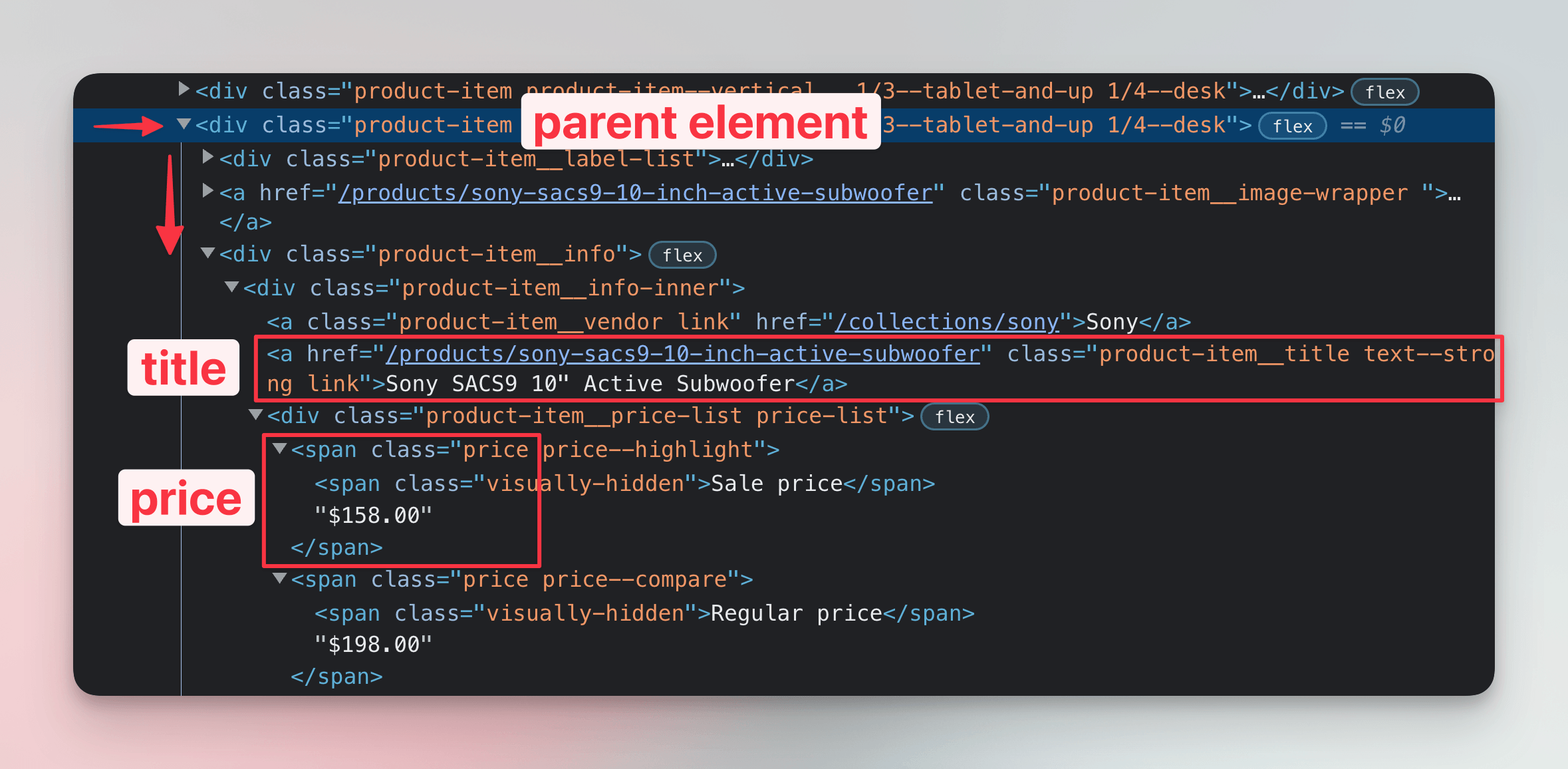
We should be looking for elements which have the product-item__title and price classes. We already know how that translates to CSS selectors:
import * as cheerio from 'cheerio';

const url = "https://warehouse-theme-metal.myshopify.com/collections/sales";
const response = await fetch(url);

if (response.ok) {
  const html = await response.text();
  const $ = cheerio.load(html);

  for (const element of $(".product-item").toArray()) {
    const $productItem = $(element);

    const $title = $productItem.find(".product-item__title");
    const title = $title.text();

    const $price = $productItem.find(".price");
    const price = $price.text();

    console.log(`${title} | ${price}`);
  }
} else {
  throw new Error(`HTTP ${response.status}`);
}
Let's run the program now:
$ python main.py
JBL Flip 4 Waterproof Portable Bluetooth Speaker |
              Sale price$74.95
Sony XBR-950G BRAVIA 4K HDR Ultra HD TV |
              Sale priceFrom $1,398.00
...
There's still some room for improvement, but it's already much better!
In jQuery and Cheerio, the core idea is a collection that wraps selected objects, usually HTML elements. To tell these wrapped selections apart from plain arrays, strings or other objects, it's common to start variable names with a dollar sign. This is just a naming convention to improve readability. The dollar sign has no special meaning and works like any other character in a variable name.
Precisely locating price
In the output we can see that the price isn't located precisely. For each product, our scraper also prints the text Sale price. Let's look at the HTML structure again. Each bit containing the price looks like this:
<span class="price">
  <span class="visually-hidden">Sale price</span>
  $74.95
</span>
When translated to a tree of JavaScript objects, the element with class price will contain several nodes:
- Textual node with white space,
- a
spanHTML element, - a textual node representing the actual amount and possibly also white space.
We can use Cheerio's .contents() method to access individual nodes. It returns a list of nodes like this:
LoadedCheerio {
  '0': <ref *1> Text {
    parent: Element { ... },
    prev: null,
    next: Element { ... },
    data: '\n              ',
    type: 'text'
  },
  '1': <ref *2> Element {
    parent: Element { ... },
    prev: <ref *1> Text { ... },
    next: Text { ... },
    children: [ [Text] ],
    name: 'span',
    type: 'tag',
    ...
  },
  '2': <ref *3> Text {
    parent: Element { ... },
    prev: <ref *2> Element { ... },
    next: null,
    data: '$74.95',
    type: 'text'
  },
  length: 3,
  ...
}
It seems like we can read the last element to get the actual amount. Let's fix our program:
import * as cheerio from 'cheerio';

const url = "https://warehouse-theme-metal.myshopify.com/collections/sales";
const response = await fetch(url);

if (response.ok) {
  const html = await response.text();
  const $ = cheerio.load(html);

  for (const element of $(".product-item").toArray()) {
    const $productItem = $(element);

    const $title = $productItem.find(".product-item__title");
    const title = $title.text();

    const $price = $productItem.find(".price").contents().last();
    const price = $price.text();

    console.log(`${title} | ${price}`);
  }
} else {
  throw new Error(`HTTP ${response.status}`);
}
We're enjoying the fact that Cheerio selections provide utility methods for accessing items, such as .first() or .last(). If we run the scraper now, it should print prices as only amounts:
$ node index.js
JBL Flip 4 Waterproof Portable Bluetooth Speaker | $74.95
Sony XBR-950G BRAVIA 4K HDR Ultra HD TV | From $1,398.00
...
Great! We have managed to use CSS selectors and walk the HTML tree to get a list of product titles and prices. But wait a second—what's From $1,398.00? One does not simply scrape a price! We'll need to clean that. But that's a job for the next lesson, which is about extracting data.
Exercises
These challenges are here to help you test what you’ve learned in this lesson. Try to resist the urge to peek at the solutions right away. Remember, the best learning happens when you dive in and do it yourself!
You're about to touch the real web, which is practical and exciting! But websites change, so some exercises might break. If you run into any issues, please leave a comment below or file a GitHub Issue.
Scrape list of International Maritime Organization members
Download International Maritime Organization's page with the list of members, use Cheerio to parse it, and print names of all the members mentioned in all tables (including Associate Members). This is the URL:
https://www.imo.org/en/ourwork/ero/pages/memberstates.aspx
Your program should print the following:
Albania
Libya
Algeria
Lithuania
...
Liberia
Zimbabwe
Faroes
Hong Kong, China
Macao, China
You may want to check out Cheerio's .eq().
Solution
import * as cheerio from 'cheerio';

const url = 'https://www.imo.org/en/ourwork/ero/pages/memberstates.aspx';
const response = await fetch(url);

if (!response.ok) {
  throw new Error(`HTTP ${response.status}`);
}

const html = await response.text();
const $ = cheerio.load(html);

for (const tableElement of $('.content table').toArray()) {
  const $table = $(tableElement);
  const rows = $table.find('tr').toArray();

  for (const rowElement of rows) {
    const $cells = $(rowElement).find('td');

    const $firstCell = $cells.eq(0);
    const firstCellText = $firstCell.text().trim();
    if (firstCellText) {
      console.log(firstCellText);
    }

    const $thirdCell = $cells.eq(2);
    const thirdCellText = $thirdCell.text().trim();
    if (thirdCellText) {
      console.log(thirdCellText);
    }
  }
}
We visit each row and if we find some table data cells, we take the text of the first and third ones. We print it if it's not empty. This approach skips table headers and empty rows.
Use CSS selectors to their max
Simplify your International Maritime Organization scraper from the previous exercise. Use just one for loop with a single CSS selector that targets all relevant table cells.
You may want to check out the following pages:
Solution
import * as cheerio from 'cheerio';

const url = 'https://www.imo.org/en/ourwork/ero/pages/memberstates.aspx';
const response = await fetch(url);

if (!response.ok) {
  throw new Error(`HTTP ${response.status}`);
}

const html = await response.text();
const $ = cheerio.load(html);

for (const element of $('.content table tr td:nth-child(odd)').toArray()) {
  const name = $(element).text().trim();
  if (name) {
    console.log(name);
  }
}
Scrape F1 news
Download Guardian's page with the latest F1 news, use Cheerio to parse it, and print titles of all the listed articles. This is the URL:
https://www.theguardian.com/sport/formulaone
Your program should print something like the following:
Wolff confident Mercedes are heading to front of grid after Canada improvement
Frustrated Lando Norris blames McLaren team for missed chance
Max Verstappen wins Canadian Grand Prix: F1 – as it happened
...
Solution
import * as cheerio from 'cheerio';

const url = 'https://www.theguardian.com/sport/formulaone';
const response = await fetch(url);

if (!response.ok) {
  throw new Error(`HTTP ${response.status}`);
}

const html = await response.text();
const $ = cheerio.load(html);

for (const element of $('#maincontent ul li h3').toArray()) {
  const title = $(element).text().trim();
  if (title) {
    console.log(title);
  }
}